| Type: | Package |
| Title: | Chic and Sleek Functions for Beautiful Statisticians |
| Version: | 0.1.2 |
| Maintainer: | Aidan J. Wagner <JesusButForGayPeople@proton.me> |
| Description: | Because your linear models deserve better than console output. A sleek color palette and kable styling to make your regression results look sharper than they are. Includes support for Partial Least Squares (PLS) regression via both the SVD and NIPALS algorithms, along with a unified interface for model fitting and fabulous LaTeX and console output formatting. See the package website at https://finitesample.space/snazzier. |
| License: | MIT + file LICENSE |
| Encoding: | UTF-8 |
| LazyData: | true |
| ByteCompile: | true |
| Imports: | ggplot2, knitr, kableExtra, dplyr, stats |
| RoxygenNote: | 7.3.2 |
| Depends: | R (≥ 4.1.0) |
| Suggests: | rmarkdown, testthat (≥ 3.0.0) |
| Config/testthat/edition: | 3 |
| VignetteBuilder: | knitr |
| URL: | https://detectivefierce.github.io/snazzieR/ |
| NeedsCompilation: | no |
| Packaged: | 2025-12-16 22:32:07 UTC; shared-psychosis |
| Author: | Aidan J. Wagner [aut, cre] |
| Repository: | CRAN |
| Date/Publication: | 2025-12-16 22:50:02 UTC |
Generate a Summary Table for ANOVA Results
Description
This function creates a summary table for ANOVA results, including degrees of freedom, sum of squares, mean squares, F-values, and p-values. The table can be output as either LaTeX (for PDF reports) or plain text (for console viewing).
Usage
ANOVA.summary.table(model, caption, latex = TRUE)
Arguments
model |
A model object for which ANOVA results are computed (e.g., output from 'lm()' or 'aov()'). |
caption |
A character string to be used as the caption for the table. |
latex |
Logical; if 'TRUE', returns a LaTeX-formatted table using 'kableExtra'. If 'FALSE', prints a plain-text version to the console. |
Value
If 'latex = TRUE', a LaTeX-formatted table object. If 'latex = FALSE', prints the summary table and returns it (invisibly).
Examples
# Fit a linear model
model <- lm(mpg ~ wt + hp, data = mtcars)

# Generate a plain-text ANOVA summary table
ANOVA.summary.table(model, caption = "ANOVA Summary", latex = FALSE)
Partial Least Squares Regression via NIPALS (Internal)
Description
This function is called internally by pls.regression and is not intended
to be used directly. Use pls.regression(..., calc.method = "NIPALS") instead.
Performs Partial Least Squares (PLS) regression using the NIPALS (Nonlinear Iterative Partial Least Squares) algorithm. This method estimates the latent components (scores, loadings, weights) by iteratively updating the X and Y score directions until convergence. It is suitable for cases where the number of predictors is large or predictors are highly collinear.
Usage
NIPALS.pls(x, y, n.components = NULL)
Arguments
x |
A numeric matrix or data frame of predictors (X). Should have dimensions n × p. |
y |
A numeric matrix or data frame of response variables (Y). Should have dimensions n × q. |
n.components |
Integer specifying the number of PLS components to extract. If NULL, it defaults to |
Details
The algorithm standardizes both x and y using z-score normalization. It then performs the following for each
of the n.components latent variables:
Initializes a random response score vector
u.Iteratively:
Updates the X weight vector
w = E^\top u, normalized.Computes the X score
t = E w, normalized.Updates the Y loading
q = F^\top t, normalized.Updates the response score
u = F q.Repeats until
tconverges below a tolerance threshold.
Computes scalar regression coefficient
b = t^\top u.Deflates residual matrices
EandFto remove current component contribution.
After component extraction, the final regression coefficient matrix B_{original} is computed and rescaled to the original
data units. Explained variance is also computed component-wise and cumulatively.
Value
A list with the following elements:
- model.type
Character string indicating the model type ("PLS Regression").
- T
Matrix of X scores (n × H).
- U
Matrix of Y scores (n × H).
- W
Matrix of X weights (p × H).
- C
Matrix of normalized Y weights (q × H).
- P_loadings
Matrix of X loadings (p × H).
- Q_loadings
Matrix of Y loadings (q × H).
- B_vector
Vector of regression scalars (length H), one for each component.
- coefficients
Matrix of regression coefficients in original data scale (p × q).
- intercept
Vector of intercepts (length q). Always zero here due to centering.
- X_explained
Percent of total X variance explained by each component.
- Y_explained
Percent of total Y variance explained by each component.
- X_cum_explained
Cumulative X variance explained.
- Y_cum_explained
Cumulative Y variance explained.
References
Wold, H., & Lyttkens, E. (1969). Nonlinear iterative partial least squares (NIPALS) estimation procedures. Bulletin of the International Statistical Institute, 43, 29–51.
Examples
## Not run:
X <- matrix(rnorm(100 * 10), 100, 10)
Y <- matrix(rnorm(100 * 2), 100, 2)
model <- pls.regression(X, Y, n.components = 3, calc.method = "NIPALS")
model$coefficients

## End(Not run)
Partial Least Squares Regression via SVD (Internal)
Description
This function is called internally by pls.regression and is not intended
to be used directly. Use pls.regression(..., calc.method = "SVD") instead.
Performs Partial Least Squares (PLS) regression using the Singular Value Decomposition (SVD)
of the cross-covariance matrix. This method estimates the latent components by identifying directions
in the predictor and response spaces that maximize their covariance, using the leading singular vectors
of the matrix R = X^\top Y.
Usage
SVD.pls(x, y, n.components = NULL)
Arguments
x |
A numeric matrix or data frame of predictors (X). Should have dimensions n × p. |
y |
A numeric matrix or data frame of response variables (Y). Should have dimensions n × q. |
n.components |
Integer specifying the number of PLS components to extract. If NULL, defaults to |
Details
The algorithm begins by z-scoring both x and y (centering and scaling to unit variance).
The initial residual matrices are set to the scaled values: E = X_scaled, F = Y_scaled.
For each component h = 1, ..., H:
Compute the cross-covariance matrix
R = E^\top F.Perform SVD on
R = U D V^\top.Extract the first singular vectors:
w = U[,1],q = V[,1].Compute scores:
t = E w(normalized),u = F q.Compute loadings:
p = E^\top t, regression scalarb = t^\top u.Deflate residuals:
E \gets E - t p^\top,F \gets F - b t q^\top.
After all components are extracted, a post-processing step removes components with zero regression
weight. The scaled regression coefficients are computed using the Moore–Penrose pseudoinverse of the
loading matrix P, and then rescaled to the original variable units.
Value
A list containing:
- model.type
Character string indicating the model type ("PLS Regression").
- T
Matrix of predictor scores (n × H).
- U
Matrix of response scores (n × H).
- W
Matrix of predictor weights (p × H).
- C
Matrix of normalized response weights (q × H).
- P_loadings
Matrix of predictor loadings (p × H).
- Q_loadings
Matrix of response loadings (q × H).
- B_vector
Vector of scalar regression weights (length H).
- coefficients
Matrix of final regression coefficients in the original scale (p × q).
- intercept
Vector of intercepts (length q). All zeros due to centering.
- X_explained
Percent of total X variance explained by each component.
- Y_explained
Percent of total Y variance explained by each component.
- X_cum_explained
Cumulative X variance explained.
- Y_cum_explained
Cumulative Y variance explained.
References
Abdi, H., & Williams, L. J. (2013). Partial least squares methods: Partial least squares correlation and partial least square regression. Methods in Molecular Biology (Clifton, N.J.), 930, 549–579. doi:10.1007/978-1-62703-059-5_23
de Jong, S. (1993). SIMPLS: An alternative approach to partial least squares regression. Chemometrics and Intelligent Laboratory Systems, 18(3), 251–263. doi:10.1016/0169-7439(93)85002-X
Examples
## Not run:
X <- matrix(rnorm(100 * 10), 100, 10)
Y <- matrix(rnorm(100 * 2), 100, 2)
model <- pls.regression(X, Y, n.components = 3, calc.method = "SVD")
model$coefficients

## End(Not run)
Display a Color Reference Palette
Description
This function generates a plot displaying a predefined color palette with color codes for easy reference. The palette includes shades of Red, Orange, Yellow, Green, Blue, Purple, and Grey.
Usage
color.ref()
Details
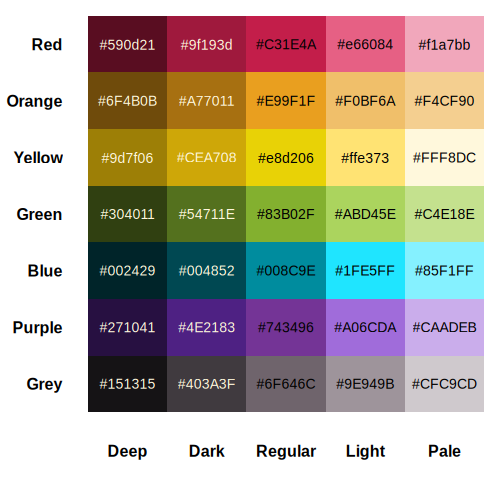
Value
A plot displaying the color palette.
Examples
color.ref()
SnazzieR Color Palette
Description
A collection of named hex colors grouped by hue and tone.
Each color is available as an exported object (e.g., Red, Dark.Red).
Usage
color.list
Format
Each color is a character string representing a hex code.
An object of class character of length 1.
An object of class list of length 35.
Details
| Name | Hex | Swatch | Name | Hex | Swatch | |
| Deep.Red | #590D21 |  | Deep.Green | #304011 |  |
|
| Dark.Red | #9F193D |  | Dark.Green | #54711E |  |
|
| Red | #C31E4A |  | Green | #83B02F |  |
|
| Light.Red | #E66084 |  | Light.Green | #ABD45E |  |
|
| Pale.Red | #F1A7BB |  | Pale.Green | #C4E18E |  |
|
| Deep.Orange | #6F4B0B |  | Deep.Blue | #002429 |  |
|
| Dark.Orange | #A77011 |  | Dark.Blue | #004852 |  |
|
| Orange | #E99F1F |  | Blue | #008C9E |  |
|
| Light.Orange | #F0BF6A |  | Light.Blue | #1FE5FF |  |
|
| Pale.Orange | #F4CF90 |  | Pale.Blue | #85F1FF |  |
|
| Deep.Yellow | #9D7F06 |  | Deep.Purple | #271041 |  |
|
| Dark.Yellow | #CEA708 |  | Dark.Purple | #4E2183 |  |
|
| Yellow | #E8D206 |  | Purple | #743496 |  |
|
| Light.Yellow | #FFE373 |  | Light.Purple | #A06CDA |  |
|
| Pale.Yellow | #FFF8DC |  | Pale.Purple | #CAADEB |  |
|
| Deep.Grey | #151315 |  | ||||
| Dark.Grey | #403A3F |  | ||||
| Grey | #6F646C |  | ||||
| Light.Grey | #9E949B |  | ||||
| Pale.Grey | #CFC9CD |  |
See Also
Create K-Fold Cross Validation Splits
Description
Create K-Fold Cross Validation Splits
Usage
create_kfold_splits(data, k = 5, seed = NULL)
Arguments
data |
A data frame containing the dataset |
k |
Number of folds (default: 5) |
seed |
Random seed for reproducibility (optional) |
Value
A list containing fold assignments for each observation
Compute Cross-Validated Mean Squared Error
Description
Computes mean squared error via k-fold cross-validation for a fixed lambda value.
Usage
cv.mse(x, y, lambda, folds = 5, fold_indices = NULL)
Arguments
x |
A standardized design matrix (n × p) |
y |
A centered response vector (n × 1) |
lambda |
A non-negative regularization scalar |
folds |
Number of cross-validation folds (default: 5) |
Value
A numeric scalar representing the CV-MSE
Summarize Eigenvalues and Eigenvectors of a Covariance Matrix
Description
This function computes the eigenvalues and eigenvectors of a given covariance matrix, ensures sign consistency in the eigenvectors, and outputs either a LaTeX table or plaintext summary displaying the results.
Usage
eigen.summary(
  cov.matrix,
  caption = "Eigenvectors of Covariance Matrix",
  latex = TRUE
)
Arguments
cov.matrix |
A square numeric matrix representing the covariance matrix. |
caption |
A character string specifying the table caption (default: "Eigenvectors of Covariance Matrix"). |
latex |
A logical indicating whether to output LaTeX table (default: TRUE). If FALSE, prints as plain text. |
Value
A LaTeX formatted table (if latex = TRUE) or plaintext console output (if latex = FALSE).
Examples
cov_matrix <- matrix(c(4, 2, 2, 3), nrow = 2)
eigen.summary(cov_matrix, caption = "Eigenvalues and Eigenvectors", latex = FALSE)
Fit Ridge Regression with Closed-Form Solution
Description
Computes ridge regression coefficients and standard errors using the closed-form solution:
\hat{\beta} = (X^T X + \lambda I)^{-1} X^T y
Usage
fit.ridge(x, y, lambda)
Arguments
x |
A standardized design matrix (n × p) |
y |
A centered response vector (n × 1) |
lambda |
A non-negative regularization scalar |
Value
A list containing:
- coefficients
Ridge regression coefficients (length p)
- std_errors
Standard errors of the coefficients (length p)
Format PLS Model Output as LaTeX or Console Tables
Description
Formats and displays Partial Least Squares (PLS) model output from pls.regression()
as either LaTeX tables (for PDF rendering) or console-friendly output.
Usage
## S3 method for class 'pls'
format(x, ..., include.scores = TRUE, latex = FALSE)
Arguments
x |
A list returned by |
... |
Further arguments passed to or from methods (unused). |
include.scores |
Logical. Whether to include score matrices (T and U). Default is |
latex |
Logical. If |
Value
When latex = TRUE, returns a knitr::asis_output object (LaTeX code). When FALSE, prints formatted tables to console.
Perform K-Fold Cross Validation
Description
Perform K-Fold Cross Validation
Usage
kfold_cross_validation(
  data,
  formula,
  model_function,
  predict_function = predict,
  metric_function = NULL,
  k = 5,
  seed = NULL,
  ...
)
Arguments
data |
A data frame containing the dataset |
formula |
A formula specifying the model (e.g., y ~ x1 + x2) |
model_function |
Function to fit the model (e.g., lm, glm) |
predict_function |
Function to make predictions (default: predict) |
metric_function |
Function to calculate performance metric |
k |
Number of folds (default: 5) |
seed |
Random seed for reproducibility (optional) |
... |
Additional arguments passed to model_function |
Value
A list containing fold results and summary statistics
Generate a Model Equation from a Linear Model
Description
This function extracts and formats the equation from a linear model object. It includes an option to return the equation as a LaTeX-formatted string or print it to the console.
Usage
model.equation(model, latex = TRUE)
Arguments
model |
A linear model object (e.g., output from 'lm()'). |
latex |
A logical value indicating whether to return a LaTeX-formatted equation (default: TRUE). If FALSE, the equation is printed to the console. |
Value
If 'latex' is TRUE, the equation is returned as LaTeX code using 'knitr::asis_output()'. If FALSE, the equation is printed to the console.
Examples
# Fit a linear model
model <- lm(mpg ~ wt + hp, data = mtcars)

# Get LaTeX equation
model.equation(model)

# Print equation to console
model.equation(model, latex = FALSE)
Generate a Summary Table for a Linear Model
Description
This function creates a summary table for a linear model, including estimated coefficients, standard errors, p-values with significance codes, and model statistics such as MSE and R-squared. The table can be output as either LaTeX (for PDF reports) or plain text (for console viewing).
Usage
model.summary.table(model, caption, latex = TRUE)
Arguments
model |
A linear model object (typically the result of 'lm()'). |
caption |
A character string to be used as the caption for the table. |
latex |
Logical; if 'TRUE' (default), returns a LaTeX-formatted table using 'kableExtra'. If 'FALSE', prints plain-text summary tables to the console. |
Value
If 'latex = TRUE', returns a LaTeX-formatted 'kableExtra' table object. If 'latex = FALSE', prints formatted summary tables to the console and returns the underlying data frame.
Examples
# Fit a linear model
model <- lm(mpg ~ wt + hp, data = mtcars)

# Print a plain-text version to the console
model.summary.table(model, caption = "Linear Model Summary", latex = FALSE)
Optimize Lambda Using Cross-Validation
Description
Searches the lambda range to minimize CV-MSE using Brent's method via 'optimize()'.
Usage
optimize.cv.lambda(x, y, lambda.range, folds)
Arguments
x |
A standardized design matrix (n × p) |
y |
A centered response vector (n × 1) |
lambda.range |
A numeric vector of length 2 specifying the search interval |
folds |
Number of cross-validation folds |
Value
A list containing:
- minimum
Optimal lambda value
- objective
Minimum CV-MSE achieved
- trace
Data frame with lambda and CV-MSE pairs
Partial Least Squares (PLS) Regression Interface
Description
Performs Partial Least Squares (PLS) regression using either the NIPALS or SVD algorithm for component extraction.
This is the main user-facing function for computing PLS models. Internally, it delegates to either NIPALS.pls() or SVD.pls().
Usage
pls.regression(x, y, n.components = NULL, calc.method = c("SVD", "NIPALS"))
Arguments
x |
A numeric matrix or data frame of predictor variables (X), with dimensions n × p. |
y |
A numeric matrix or data frame of response variables (Y), with dimensions n × q. |
n.components |
Integer specifying the number of latent components (H) to extract. If NULL, defaults to the rank of |
calc.method |
Character string indicating the algorithm to use. Must be either |
Details
This function provides a unified interface for Partial Least Squares regression. Based on the value of calc.method,
it computes latent variables using either:
-
"SVD"— A direct method using the singular value decomposition of the cross-covariance matrix (X^\top Y). -
"NIPALS"— An iterative method that alternately estimates predictor and response scores until convergence.
The outputs from both methods include scores, weights, loadings, regression coefficients, and explained variance.
Value
A list (from either SVD.pls() or NIPALS.pls()) containing:
- model.type
Character string ("PLS Regression").
- T, U
Score matrices for X and Y.
- W, C
Weight matrices for X and Y.
- P_loadings, Q_loadings
Loading matrices.
- B_vector
Component-wise regression weights.
- coefficients
Final regression coefficient matrix (rescaled).
- intercept
Intercept vector (typically zero due to centering).
- X_explained, Y_explained
Variance explained by each component.
- X_cum_explained, Y_cum_explained
Cumulative variance explained.
References
Abdi, H., & Williams, L. J. (2013). Partial least squares methods: Partial least squares correlation and partial least square regression. Methods in Molecular Biology (Clifton, N.J.), 930, 549–579. doi:10.1007/978-1-62703-059-5_23
de Jong, S. (1993). SIMPLS: An alternative approach to partial least squares regression. Chemometrics and Intelligent Laboratory Systems, 18(3), 251–263. doi:10.1016/0169-7439(93)85002-X
See Also
Examples
## Not run:
X <- matrix(rnorm(100 * 10), 100, 10)
Y <- matrix(rnorm(100 * 2), 100, 2)

# Using SVD (default)
model1 <- pls.regression(X, Y, n.components = 3)

# Using NIPALS
model2 <- pls.regression(X, Y, n.components = 3, calc.method = "NIPALS")

## End(Not run)
Format PLS Model Output as LaTeX Tables
Description
Formats and displays Partial Least Squares (PLS) model output from pls.regression()
as LaTeX tables for PDF rendering.
Usage
pls.summary(x, ..., include.scores = TRUE)
Arguments
x |
A list returned by |
... |
Further arguments passed to or from methods (unused). |
include.scores |
Logical. Whether to include score matrices (T and U). Default is |
Value
Returns a knitr::asis_output object (LaTeX code) for PDF rendering.
Examples
# Load example data
data(mtcars)

# Prepare data for PLS regression
X <- mtcars[, c("wt", "hp", "disp")]
Y <- mtcars[, "mpg", drop = FALSE]

# Fit PLS model with 2 components
pls.fit <- pls.regression(X, Y, n.components = 2)

# Print a LaTeX-formatted summary
pls.summary(pls.fit, include.scores = FALSE)
Predict Method for Ridge Model Objects
Description
Predicts response values for new data using a fitted ridge model.
Usage
## S3 method for class 'ridge.model'
predict(object, newdata = NULL, ...)
Arguments
object |
A 'ridge.model' object |
newdata |
A data frame or matrix containing new predictor values |
... |
Additional arguments (not used) |
Value
A numeric vector of predicted values
Print Method for Ridge Model Objects
Description
Prints a summary of the ridge model fit.
Usage
## S3 method for class 'ridge.model'
print(x, ...)
Arguments
x |
A 'ridge.model' object |
... |
Additional arguments (not used) |
Ridge Regression with Automatic Lambda Selection
Description
Performs ridge regression with automatic selection of the optimal regularization parameter 'lambda' by minimizing k-fold cross-validated mean squared error (CV-MSE) using Brent's method. Supports both formula and matrix interfaces.
Usage
ridge.regression(
  formula = NULL,
  data = NULL,
  x = NULL,
  y = NULL,
  lambda.range = c(1e-04, 100),
  folds = 5,
  ...
)
Arguments
formula |
A model formula like 'y ~ x1 + x2'. Mutually exclusive with 'x'/'y'. |
data |
A data frame containing all variables used in the formula. |
x |
A numeric matrix of predictor variables (n × p). Used when formula is not provided. |
y |
A numeric vector of response variables (n × 1). Used when formula is not provided. |
lambda.range |
A numeric vector of length 2 specifying the interval for lambda optimization. Default: 'c(1e-4, 100)'. |
folds |
An integer specifying the number of cross-validation folds. Default: '5'. |
... |
Additional arguments passed to internal methods. |
Details
This function implements ridge regression with automatic hyperparameter tuning. The algorithm:
Standardizes predictor variables (centers and scales)
Centers the response variable
Uses k-fold cross-validation to find the optimal lambda
Fits the final model with the optimal lambda
Returns a structured object for prediction and analysis
The ridge regression solution is computed using the closed-form formula:
\hat{\beta} = (X^T X + \lambda I)^{-1} X^T y
Value
A 'ridge.model' object containing:
- coefficients
Final ridge coefficients (no intercept)
- std_errors
Standard errors of the coefficients
- intercept
Intercept term (from y centering)
- optimal.lambda
Best lambda minimizing CV-MSE
- cv.ms
Minimum CV-MSE achieved
- cv.results
Data frame with lambda and CV-MSE pairs
- x.scale
Standardization info: mean and sd for each predictor
- y.center
Centering constant for y
- fitted.values
Final model predictions on training data
- residuals
Training residuals (y - fitted)
- call
Matched call (for debugging)
- method
Always "ridge"
- folds
Number of CV folds used
- formula
Stored if formula interface used
- terms
Stored if formula interface used
References
Hoerl, A. E., & Kennard, R. W. (1970). Ridge regression: Biased estimation for nonorthogonal problems. Technometrics, 12(1), 55-67.
See Also
Examples
## Not run:
# Formula interface
model1 <- ridge.regression(mpg ~ wt + hp + disp, data = mtcars)

# Matrix interface
X <- as.matrix(mtcars[, c("wt", "hp", "disp")])
y <- mtcars$mpg
model2 <- ridge.regression(x = X, y = y)

# Custom lambda range and folds
model3 <- ridge.regression(mpg ~ .,
    data = mtcars,
    lambda.range = c(0.1, 10), folds = 10
)

## End(Not run)
Format Ridge Model Output as LaTeX Tables
Description
Formats and displays ridge regression model output from ridge.regression()
as LaTeX tables for PDF rendering or plain text for console viewing.
Usage
ridge.summary(x, ..., include.cv.trace = TRUE, latex = TRUE)
Arguments
x |
A ridge model object returned by |
... |
Further arguments passed to or from methods (unused). |
include.cv.trace |
Logical. Whether to include cross-validation trace information. Default is |
latex |
Logical; if |
Value
If latex = TRUE, returns a knitr::asis_output object (LaTeX code) for PDF rendering.
If latex = FALSE, prints formatted summary tables to the console and returns the underlying data frames.
Examples
# Load example data
data(mtcars)

# Fit ridge regression model
ridge.fit <- ridge.regression(mpg ~ wt + hp + disp, data = mtcars)

# Print a LaTeX-formatted summary
ridge.summary(ridge.fit, include.cv.trace = FALSE)

# Print a plain-text summary
ridge.summary(ridge.fit, include.cv.trace = FALSE, latex = FALSE)
A Custom ggplot2 Theme for Publication-Ready Plots
Description
This theme provides a clean, polished look for ggplot2 plots, with a focus on readability and aesthetics. It includes a custom color palette and formatting for titles, axes, and legends.
Usage
snazzieR.theme()
Value
A ggplot2 theme object.
See Also
Examples
library(ggplot2)
set.seed(123)
chains.df <- data.frame(
  Iteration = 1:500,
  alpha.1 = cumsum(rnorm(500, mean = 0.01, sd = 0.2)) + rnorm(1, 5, 0.2),
  alpha.2 = cumsum(rnorm(500, mean = 0.005, sd = 0.2)) + rnorm(1, 5, 0.2),
  alpha.3 = cumsum(rnorm(500, mean = 0.000, sd = 0.2)) + rnorm(1, 5, 0.2),
  alpha.4 = cumsum(rnorm(500, mean = -0.005, sd = 0.2)) + rnorm(1, 5, 0.2),
  alpha.5 = cumsum(rnorm(500, mean = -0.01, sd = 0.2)) + rnorm(1, 5, 0.2)
)
chain.colors <- c("Chain 1" = Red, "Chain 2" = Orange, "Chain 3" = Yellow,
                  "Chain 4" = Green, "Chain 5" = Blue)
ggplot(chains.df, aes(x = Iteration)) +
  geom_line(aes(y = alpha.1, color = "Chain 1"), linewidth = 1.2) +
  geom_line(aes(y = alpha.2, color = "Chain 2"), linewidth = 1.2) +
  geom_line(aes(y = alpha.3, color = "Chain 3"), linewidth = 1.2) +
  geom_line(aes(y = alpha.4, color = "Chain 4"), linewidth = 1.2) +
  geom_line(aes(y = alpha.5, color = "Chain 5"), linewidth = 1.2) +
  labs(x = "Iteration", y = expression(alpha),
       title = expression("Traceplot for " ~ alpha)) +
  scale_color_manual(values = chain.colors, name = "Chains") +
  snazzieR.theme()